Mount: The Display Typeface That Commands Attention
Every designer hits a point where the standard sans-serif or classic serif just won't cut it. You’re working on a project that demands presence, something that refuses to blend into the background. This is where typography stops being a utility and starts becoming the focal point of the design. If you are looking for a font that acts less like a vessel for words and more like a piece of art, Mount is the kind of typeface that changes the trajectory of a project.
Unlike the workhorse fonts designed for long-form body text, Mount is a stunning decorative display font built specifically to be the center of attention. It isn't trying to be invisible or "readable" in the traditional sense of a news article. Instead, it features unique artistic elements and a strong visual personality. For creators who want to break away from the ordinary—whether you are designing a movie poster, a high-end fashion label, or a bold social media campaign—this font offers a professional and polished finish that feels distinctly modern.
Breaking Down the Visual Personality
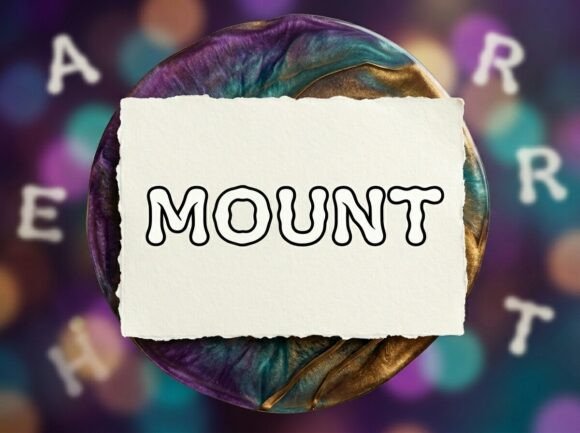
What makes a font like Mount effective? It comes down to the details. When we talk about modern typography, we are often looking for that balance between innovation and legibility. Mount manages to be artistic without descending into illegibility. The letterforms are crafted with a heavy, confident weight, making them ideal for headlines where you need to establish hierarchy immediately.
Because it is a premium font, the vectors are clean, and the curves are smooth, ensuring that whether you are printing a billboard or exporting a web banner, the edges remain crisp. However, there is a specific characteristic you need to be aware of before you start kerning: Mount is an ALL-CAPS typeface. It does not include lowercase letters.
This is a crucial detail for your workflow. This isn't a bug; it is a design choice. Display fonts that utilize uppercase-only styling are often optimized for high-impact headlines and decorative initials. It forces a uniformity in the text block that creates a solid, architectural shape—a visual "mountain" of text, if you will. It ensures that every letter sits with the same visual weight, creating a seamless flow for logos and lockups.
Practical Applications: Where Mount Shines
Understanding the technical specs is one thing, but applying them to real-world scenarios is where the value lies. As a creative font, Mount is incredibly versatile, provided you use it for the right context. Here is how different professionals can leverage this typeface.
1. Branding and Logo Design
For entrepreneurs and brand identity specialists, a logo needs to be memorable. A common mistake in logo design is using a generic font that looks like everyone else’s. Mount offers a unique silhouette. Its decorative nature makes it perfect for creating a wordmark that stands out. Because it is uppercase-only, it conveys authority and stability—traits that are excellent for streetwear brands, creative agencies, or luxury goods. Just remember that for a logo, you are likely using just one or two words, so the heavy visual style won't overwhelm the viewer.
2. Packaging and Merchandise
If you are involved in packaging design, you know that shelf appeal is everything. You have roughly three seconds to grab a customer's attention. Mount works beautifully for the product name or a catchy slogan on the front of a box, bag, or label. Its artistic flair adds a layer of perceived value to the product, suggesting that the contents are premium. This extends to merchandise like t-shirts, tote bags, and hats, where bold typography often outperforms intricate illustrations.
Digital Presence and Editorial Layouts
In the realm of web design and editorial design, contrast is key. You wouldn't use Mount for a blog post's body text, but it is exceptional for H1 headers or pull quotes. When used on a website hero section, it immediately sets the mood. For social media graphics, where users scroll rapidly, a bold display font like this can stop the scroll. It creates high-contrast visuals that translate well to Instagram stories, Pinterest pins, and YouTube thumbnails.
The Art of Font Pairing
One of the most common questions regarding decorative typefaces is: "What do I pair this with?" Because Mount has such a strong personality, it requires a quiet partner. This is where the classic principles of font pairing come into play.
If you pair Mount with another decorative or script font, you will create visual chaos. Instead, look for a neutral sans serif font or a clean serif font. A simple, geometric sans-serif works well to balance the artistic flair of Mount. For example, using Mount for a headline and a font like Montserrat or Roboto for the sub-headline creates a clear hierarchy. The display font grabs the eye, and the clean font delivers the information. This balance ensures your visual consistency remains intact across different touchpoints.
Technical Considerations and File Formats
When you invest in a commercial font, you expect reliability. Mount comes with the industry-standard file formats to ensure compatibility across your entire suite of tools.
- OTF (OpenType Font): This is the professional standard. If you are using advanced layout software like Adobe InDesign, Illustrator, or Affinity Designer, the OTF file is your go-to. It offers superior hinting and compression, allowing for the best quality rendering of those unique artistic elements.
- TTF (TrueType Font): This ensures universal compatibility. If you need to install the font on a Windows PC for use in Word or PowerPoint, or if you are using older software, the TTF file guarantees that the characters will render correctly.
Having both formats included means you aren't restricted. You can design the assets in Illustrator using the OTF and then install the TTF on your computer to mock up presentations for clients in PowerPoint without losing the visual integrity of the typeface.
Design Tips for an All-Caps Typeface
Since Mount is an ALL-CAPS (Uppercase Only) typeface, you need to adjust your design strategy slightly compared to standard fonts. Here are a few practical tips for getting the most out of it:
- Watch Your Tracking: All-caps text often requires a bit more letter-spacing (tracking) than mixed-case text. Because the letters are all the same height, they can feel cramped if placed too close together. Adding 20-50 units of tracking in your design software can open up the text and make it feel more luxurious and readable.
- Line Height Matters: Display fonts with high visual weight need breathing room. Increase your leading (line height) to prevent the lines of text from crashing into one another. This is vital for readability when using the font for multi-line headlines.
- Use it for Impact, Not Data: Avoid using Mount for dense information, legal disclaimers, or long paragraphs. Its strength lies in marketing assets where emotion and style take precedence over raw data transfer. Think posters, headers, and hero images.
Is Mount the Right Choice for Your Project?
Choosing the right typography is about matching the tool to the goal. If your goal is to create a safe, corporate report, Mount is likely too bold. But if your goal is to inject energy, creativity, and a distinct voice into a project, it is an excellent candidate.
For small business owners, this font can serve as a cornerstone of your visual identity. For content creators, it can be the secret weapon that makes your thumbnails pop. For graphic designers, it is a valuable addition to your library of design assets, ready to be deployed when a client asks for something "edgy" or "artistic."
Ultimately, Mount is a tool for those who want to make a statement. It doesn't whisper; it speaks clearly and confidently. By understanding its uppercase nature and pairing it wisely with complementary typefaces, you can create professional, polished designs that capture attention and hold it. Whether you are designing for print or pixel, this typeface offers the visual personality needed to turn a simple layout into a compelling piece of visual communication.